KakaoTalk Channel chatbot
Shop inquiry chatbot
Gives opening hours, the menu, directions and booking details at the tap of a button.
Project notes
Introduction
A KakaoTalk Channel chatbot that answers a shop's questions about opening hours, the menu, location and parking, and bookings through buttons. Questions with no set answer can go to AI, which answers only from the shop's own information.
Purpose
Answer the questions every shop gets again and again, and make it reusable for another shop by editing a single information file.
Main features
- Four button menus: opening hours, menu, location and parking, booking inquiries
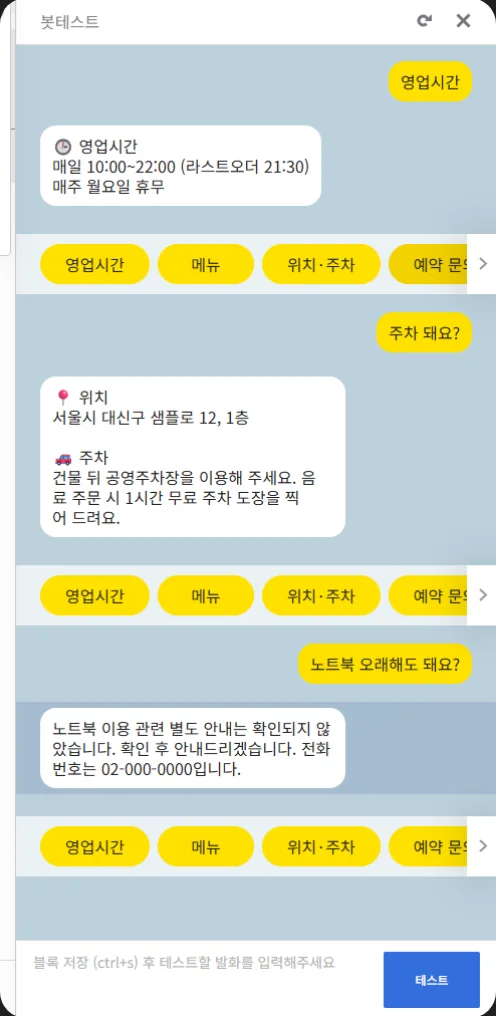
- Questions with a known keyword, such as “주차 돼요?” (is there parking?), get the stored answer straight away.
- With AI answers on, unscripted questions are answered from the shop's information only; anything it doesn't know gets a promise to check and the shop's phone number.
- Adapting it for another shop means editing only the information file (store.json).
Technology
- Kakao i Open Builder skill server
- Receives each question from Kakao's Open Builder and returns the reply (response format 2.0)
- Node.js on Vercel
- Serverless function at /api/skill
- OpenAI API
- AI answers (optional, only with a key)
- store.json
- Shop information and common questions
Problems and fixes
- Fixed
Problem: Kakao drops the reply if it takes longer than 5 seconds.
How it was fixed If the AI answer hasn't arrived within 3.5 seconds, the bot replies with the phone number instead.
- Fixed
Problem: AI could make up things the shop doesn't offer.
How it was fixed It answers only from the shop's information, and says it will check for anything that isn't there.
Result
A capture from the chatbot builder's test window shows it answering opening-hours and parking questions, and an unscripted one. The shop on screen is a test example.
See it working
- Simulation
Shop inquiry chatbot
A simulation that runs the chatbot's real code (lib/bot.js) inside this page. It is not connected to a KakaoTalk channel. The real code answers the buttons and common questions; AI answers are switched off. The shop's name, address and phone number are examples.
Open the simulation (Shop inquiry chatbot, opens in a new tab)
- Real screenshots
The screen above was captured in the chatbot builder's test window.
The screens in these demos are in Korean.
Related projects
My part and AI tools
Where AI tools were used
- The skill server code, tests and setup guide were made with an AI coding tool (Claude), per the repository history of 2026-10-03.
- The chatbot itself can optionally use AI (OpenAI).