

Chrome extension and offline tool
Blog tools for a Korean medicine clinic
Makes blog GIFs straight from video, and turns AI-written drafts into the blog's own post format.
Project notes
Introduction
Two tools for a Korean medicine clinic's blog: a one-file tool, opened in Chrome, that turns video into blog GIFs, and a Chrome extension that reformats AI-written drafts and places them in Naver's post editor. They were made for a real client; the content on screen has been replaced with examples.
Purpose
Reformat drafts to match the client's blog style, and make blog GIFs right on the computer.
Main features
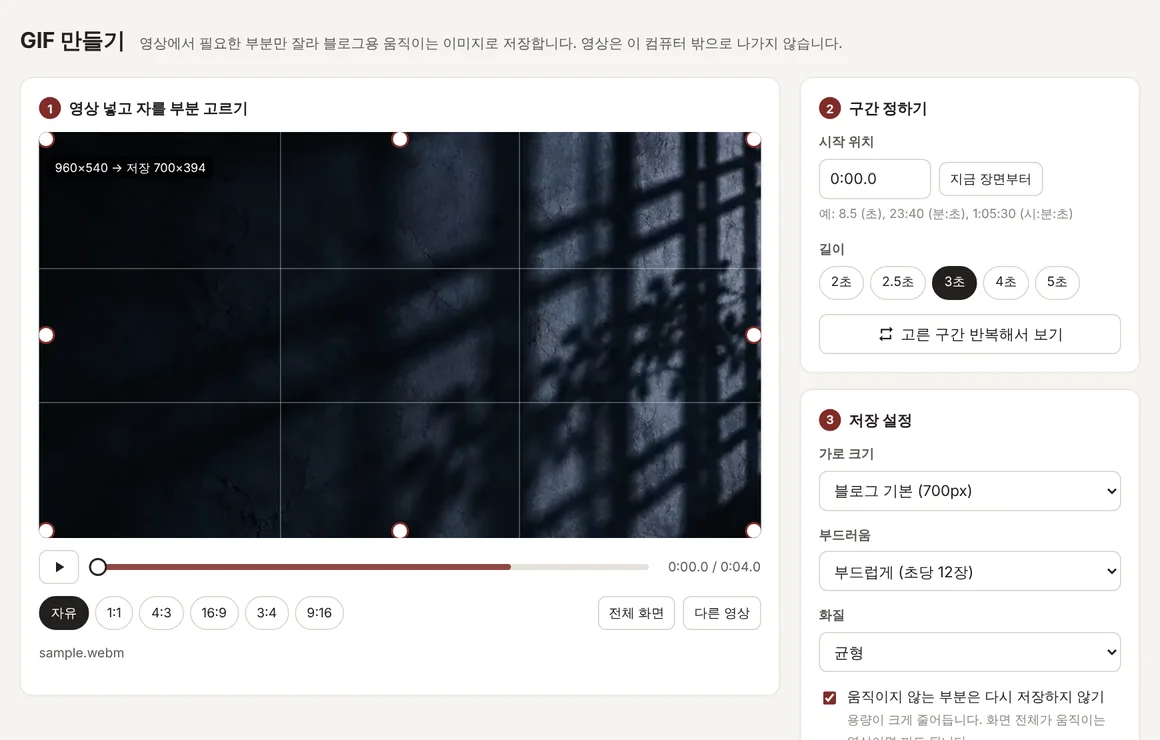
- GIF maker: drop in a video, choose the crop and a 2 to 5 second range, and save a GIF in one of three quality levels.
- GIF maker: the video never leaves the computer.
- GIF maker: the start time can be typed as 8.5, 23:40, 1:05:30 or 23분 40초.
- Blog helper: converts the draft's subheadings, bold text, highlighted lines, lists, dividers, signature and homepage link into the blog's format.
- Blog helper: saves the fixed blocks that open and close every post, such as images and a map, and pastes them back in.
- Blog helper: compares the post before and after inserting to confirm it worked, and leaves Publish to a person.
Technology
- HTML, JavaScript
- The whole GIF tool in a single file
- gifenc 1.0.3 (MIT)
- GIF encoding with a shared palette and Floyd–Steinberg dithering
- hevc.js 1.4.8 (MIT, WebAssembly)
- Decodes iPhone HEVC video that Chrome can't open
- Chrome extension, Manifest V3
- Side panel, chrome.scripting, chrome.debugger
- Naver SmartEditor ONE
- The editor the posts go into
- Playwright
- Tests that install the extension on a mock editor
How it was made
- 2026-10-11: first versions of the GIF tool and the blog helper, with a user guide.
- 2026-10-11: the user's iPhone recording would not open in Chrome on Windows, so a built-in HEVC decoder was added.
- 2026-10-12: tuned the conversion rules until a real post came out identical, empty lines included (v1.0.2).
- 2026-10-12: automatic inserting failed in two real Naver tests, so the insert method was changed (v1.0.3, v1.0.4).
Problems and fixes
- Fixed
Problem: Chrome on the user's Windows PC could not open an iPhone screen recording (HEVC).
How it was fixed A WebAssembly decoder is built into the file and takes over when Chrome shows no picture. The user's file then opened in about a second.
- Fixed
Problem: Finding a range in an hour-long video was slow.
How it was fixed It now reads only from the keyframe before the chosen range; a range at the 40-minute mark opens in about 1.5 seconds.
- Fixed
Problem: The client's posts follow a detailed format, down to the number of empty lines and which words are bold.
How it was fixed An automatic test feeds a real post back in as a draft and checks the output matches line for line, empty lines included (77 of 77).
- Still open
Problem: Naver's SmartEditor ONE ignored clicks and pastes made by a script.
How it was fixed The extension now sends a click and Ctrl+V through chrome.debugger, the same as real input (v1.0.4), and falls back to copy-then-paste buttons. This has not yet been confirmed in the real editor.
Result
The GIF tool opened the user's iPhone recording in about a second and made a 3-second GIF in 13 to 17 seconds in the test browser. On the user's own blog, the blog helper's manual paste brought in bold text, dividers, the signature and lists correctly; quote styling and link cards still come out differently (as of 2026-10-12).
See it working
- Working build
GIF maker (clinic blog tools)
The GIF maker made for a real client. Your video is processed inside this browser and is not sent anywhere. The blog helper from the same job is a Chrome extension that works inside Naver's post editor, so it is not here.
Try it (Blog tools for a Korean medicine clinic, opens in a new tab)
The screens in these demos are in Korean.
Related projects

My part and AI tools
What I did myself
- Tested both tools on their own Naver blog and PC, and reported what failed.
- Tried the GIF tool with their own iPhone recording.
Where AI tools were used
- The code, tests and user guide for both tools were made with an AI coding tool (Claude), per the repository history of 2026-10-11.
- The drafts the blog helper handles are themselves written by the client with GPT or Gemini.